Posts

Create New Project in Laravel

first install composer from   here . then go to your cmd Prompt in windows. go to your wamp directory and type following command. composer create-project laravel/laravel project_name --presfer-dist now laravel download in your directory with project-named folder now open this and enjoy with laravel....

How to Disable Keyboard on Any Web Page

<script> document.onkeydown = function (e) { return false; } </script>   FOR SAMLL PART OR DIV   <script> $ ( selector ). keydown ( function ( event ) { return false ; }); </script>

How to Add Favicon Image in Your Html Site

<link rel = "shortcut icon" type = "image/png" href = "/favicon.png" /> <link rel = "shortcut icon" type = "image/png" href = "http://eg.com/favicon.png" />

how to send mail with background images

<?php $to = "kr.krishna1995@gmail.com"; $subject = "hello how are you."; $message = " <html> <head> <title>HTML email</title> </head> <body> <p>This email contains HTML Tags!</p> <table background='http://www.rapscspl.com/forest/wp-content/uploads/2014/10/teresa-pic.png'> <tr> <th>Firstname</th> <th>Lastname</th> <form> </tr> <tr> <td>John</td> <td>Doe</td> </tr> </table> </body> </html> "; // Always set content-type when sending HTML email $headers = "MIME-Version: 1.0" . "\\r\ "; $headers .= "Content-type:text/html;charset=iso-8859-1" . "\\r\ "; // More headers $headers .= 'From: <vikashgupta40@gmail.com>' . "\\r\ "; $headers .= 'Cc: myboss@example.com' . "\\r\ "; mail($to,$su...

HOW TO CHANGE WORDPRESS ADMIN PASSWORD.

Image
GO TO MYSQL CONSOLE RUN FOLLOWING QUERY SELECT YOUR DATEBASE OR GO TO YOUR phpmyadmin. SELECT YOUR DATABASE. BROWSE wp_user TABLE. CHECK ADMIN AND EDIT. CHANGE wp_pass WITH SELECTING md5 in FUNCTION COLUMN. AND CLICK AND go. 

Dropdown Menu in Css and Html

DROPDOWN MENU IN CSS AND HTML HTML <ul id="menu">                 <li><a href="#">Mobile</a>                                    <ul class="submenu">                                        <li><a href="#">sony</a></li>                     <li><a href="#">apple</a></li>                     <li><a href="#">micromax</a></li>                ...

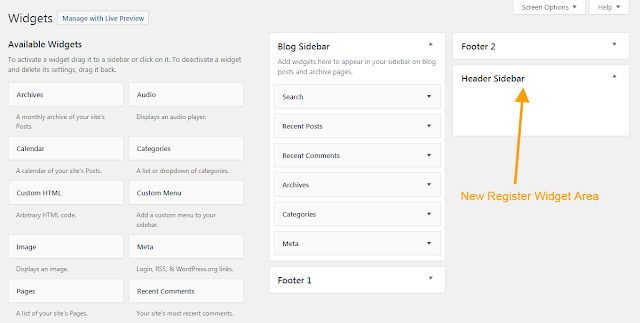
Register and Display Widget Area In Wordpress

Image
<?php /** * Register Widget Area. * */ function wpgyan_widgets_init ( ) {      register_sidebar ( array (          'name' = > 'Header Sidebar' ,          'id' = > 'header_sidebar' ,          'before_widget' = > '<div>' ,          'after_widget' = > '</div>' ,          'before_title' = > '<h2 class="rounded">' ,          'after_title' = > '</h2>' ,      ) ) ; } add_action ( 'widgets_init' , 'wpgyan_widgets_init' ) ; ?> Paste this code into your theme's functions.php file. Now you could see widget area into site backend navigating Appearance -> Widgets. . Now you could place Widgets on this widget ...